

GPT Image 2 / 2.5 / 2.6 Image Generation API
¶ 1. Get API Key
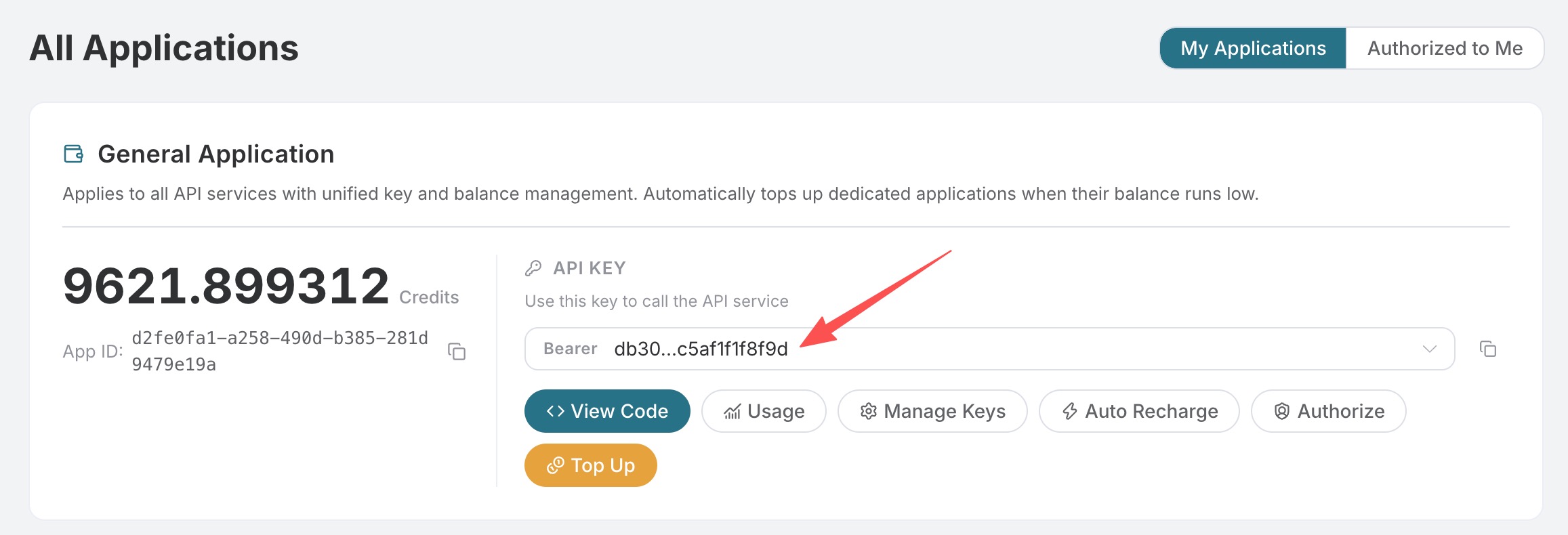
Open the Mai application list, enter an available application, and copy the API Key.
¶ 2. Send the First Request
curl https://api.ai.moses.day/openai/images/generations \
  -H "Authorization: Bearer 你的 API Key" \
  -H "Content-Type: application/json" \
  -d '{
    "model": "gpt-image-2",
    "prompt": "Minimal editorial product illustration: one plain white ceramic coffee mug centered on a solid cobalt blue tabletop, pale cream background, soft shadow, clean geometric shapes, no text, no logo, portrait composition",
    "size": "1024x1536"
  }'
The image in a successful response is located at data[].url. Below is the 1024×1536 result actually obtained through an Mai request on September 8, 2026 (task d56455e2-e7f7-4bcd-b935-475b0a1e0948, trace eb938601-8192-407f-b539-1e0554b697ec):

¶ 3. Common Parameters
| Field | Description |
|---|---|
model |
gpt-image-2 (recommended by default), gpt-image-2.5-flare (faster), or gpt-image-2.5-sunburst (higher fidelity and control); all three can select their corresponding :official variants, and gpt-image-2 also supports :reverse |
prompt |
Image description, up to 32,000 characters |
size |
auto or WIDTHxHEIGHT; width and height must be multiples of 16, the longer side must not exceed 3840, total pixels must be 655,360–8,294,400, and the aspect ratio must not exceed 3:1 |
n |
1–10; only 1 is supported when response_format=b64_json |
quality |
GPT Image models support auto, low, medium, high; 2.5 / 2.6 Flare / Sunburst (including :official) additionally support xhigh, max. Official channels are billed by actual Token usage |
response_format |
url or b64_json |
callback_url |
Optional; sends the result to this address after a long task is completed |
Common sizes:
| Ratio | 1K | 2K | 4K |
|---|---|---|---|
| 1:1 | 1024x1024 |
2048x2048 |
2880x2880 |
| 4:3 | 1536x1024 |
2048x1536 |
3264x2448 |
| 3:4 | 1024x1536 |
1536x2048 |
2448x3264 |
| 16:9 | 1792x1024 |
2048x1152 |
3840x2160 |
| 9:16 | 1024x1792 |
1152x2048 |
2160x3840 |
size: "auto" selects the canvas based on the ratio, pixels, and layout intent in the prompt; directly enter the dimensions when precise pixels are needed.
¶ Models and Billing Methods
| Model | Applicable Scenarios and Billing Methods |
|---|---|
gpt-image-2 |
Default reverse channel, fixed billing by number of successful images |
gpt-image-2:reverse |
Explicitly selects the reverse channel, fixed billing by number of successful images |
gpt-image-2:official |
Official API channel, higher stability, billed by actual Token usage |
gpt-image-2.5-flare |
Focuses on generation speed, fixed billing by number of successful images |
gpt-image-2.6-flare |
Focuses on generation speed, fixed billing by number of successful images |
gpt-image-2.5-flare:reverse |
Explicit reverse alias, equivalent to gpt-image-2.5-flare, fixed billing by number of successful images |
gpt-image-2.6-flare:reverse |
Explicit reverse alias, equivalent to gpt-image-2.6-flare, fixed billing by number of successful images |
gpt-image-2.5-flare:official |
Official API channel, higher stability and focused on generation speed, billed by actual Token usage |
gpt-image-2.6-flare:official |
Official API channel, higher stability and focused on generation speed, billed by actual Token usage |
gpt-image-2.5-sunburst |
Focuses on high fidelity and fine control, fixed billing by number of successful images |
gpt-image-2.6-sunburst |
Focuses on high fidelity and fine control, fixed billing by number of successful images |
gpt-image-2.5-sunburst:reverse |
Explicit reverse alias, equivalent to gpt-image-2.5-sunburst, fixed billing by number of successful images |
gpt-image-2.6-sunburst:reverse |
Explicit reverse alias, equivalent to gpt-image-2.6-sunburst, fixed billing by number of successful images |
gpt-image-2.5-sunburst:official |
Official API channel, higher stability and focused on high fidelity and fine control, billed by actual Token usage |
gpt-image-2.6-sunburst:official |
Official API channel, higher stability and focused on high fidelity and fine control, billed by actual Token usage |
2.0 / 2.5 reverse models (including :reverse aliases) may use GPT Image 2.5 Flare to complete requests during automatic recovery; the requested model and the billing method based on the number of successful images remain unchanged.
The displayed price for the official API channel is an estimate before the request; the final amount is subject to the actual Token usage and usage records in the response.
¶ 4. Multiple Image Generation
curl https://api.ai.moses.day/openai/images/generations \
  -H "Authorization: Bearer 你的 API Key" \
  -H "Content-Type: application/json" \
  -d '{
    "model": "gpt-image-2",
    "prompt": "A small fox reading under a glowing mushroom, watercolor illustration",
    "size": "1536x1024",
    "n": 2
  }'
gpt-image-2, gpt-image-2.5-flare, gpt-image-2.5-sunburst, and their :reverse aliases are billed by the number of successfully generated images; gpt-image-2:official, gpt-image-2.5-flare:official, and gpt-image-2.5-sunburst:official are billed based on the actual Tokens for text input and image output in the response. The page price is an estimate before the request; the final amount is based on usage records.
¶ 5. Asynchronous Callbacks
After adding callback_url to the request body, the API will first return {"task_id": "..."}, and POST the final result to that URL upon completion; synchronous requests will still return created and data:
{
  "model": "gpt-image-2",
  "prompt": "A product poster with clear typography",
  "size": "1024x1024",
  "callback_url": "https://example.com/webhooks/images"
}
The callback receiver should use task_id for deduplication, and verify the request source and data format.
¶ 6. Troubleshooting
| Status | Check |
|---|---|
| 400 | Combination of model, prompt, size format, n, and response_format |
| 401 | Whether the API Key is complete, and whether the Header is Authorization: Bearer ... |
| 429 | Requests are too frequent; retry later |
| 504 | Synchronous generation timed out; use callback_url instead |
Error responses will include error.code, error.message, and trace_id. When reporting an issue, provide the trace_id; do not provide the API Key.
For complete fields and real-time enumerations, refer to the OpenAI Images Generations API page. For image editing, see GPT Image 2 / 2.5 / 2.6 Image Editing.
¶ GPT Image 2.6
GPT Image 2.6 continues to use the generation, editing, asynchronous task, and billing APIs from 2.5:
| Model | Billing |
|---|---|
gpt-image-2.6-flare / gpt-image-2.6-flare:reverse |
0.22 Credits/image |
gpt-image-2.6-sunburst / gpt-image-2.6-sunburst:reverse |
0.22 Credits/image |
gpt-image-2.6-flare:official |
Same as 2.5 official, billed by actual Token usage |
gpt-image-2.6-sunburst:official |
Same as 2.5 official, billed by actual Token usage |
Available quality options are auto, low, medium, high, xhigh, and max; use auto for size or a WIDTHxHEIGHT that meets the above constraints. This API supports png, jpeg, and webp, and does not currently support SVG/GIF. Editing supports JSON image URLs and multipart file uploads. :reverse is an explicit alias for the standard version with the same name. Please use the full model name; do not pass gpt-image-2.6.